


Tutorial: Embedding Pics


Thread Starter
|
Senior Member
Joined: Oct 2008
Posts: 328
From: Newfoundland, Canada
1st Gear Member
 Tutorial: Embedding Pics
Every now and again someone runs into the problem of trying to figure how to get pics up sensibly. So I did a little tutorial for future reference.
This is based on Photobucket. So first thing you will have to do is sign up for a free account on their site. Once thats looked after sign and and you should see a page that looks something like this:
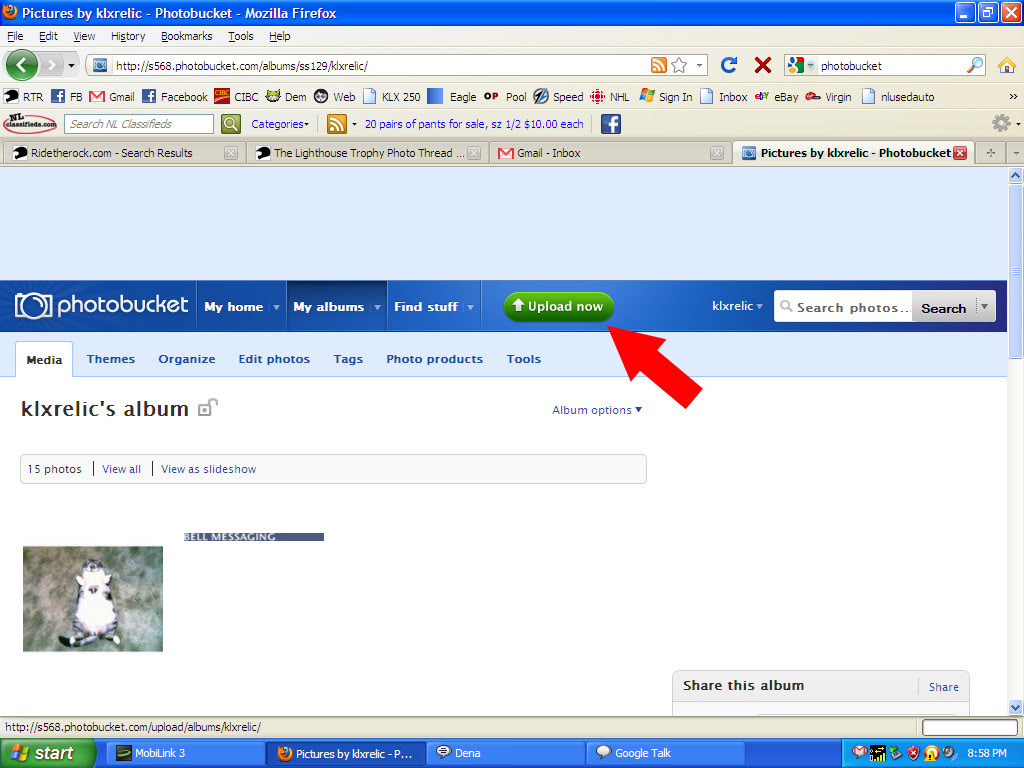
Click on the "Upload now" button.
You will then be brought to this screen:
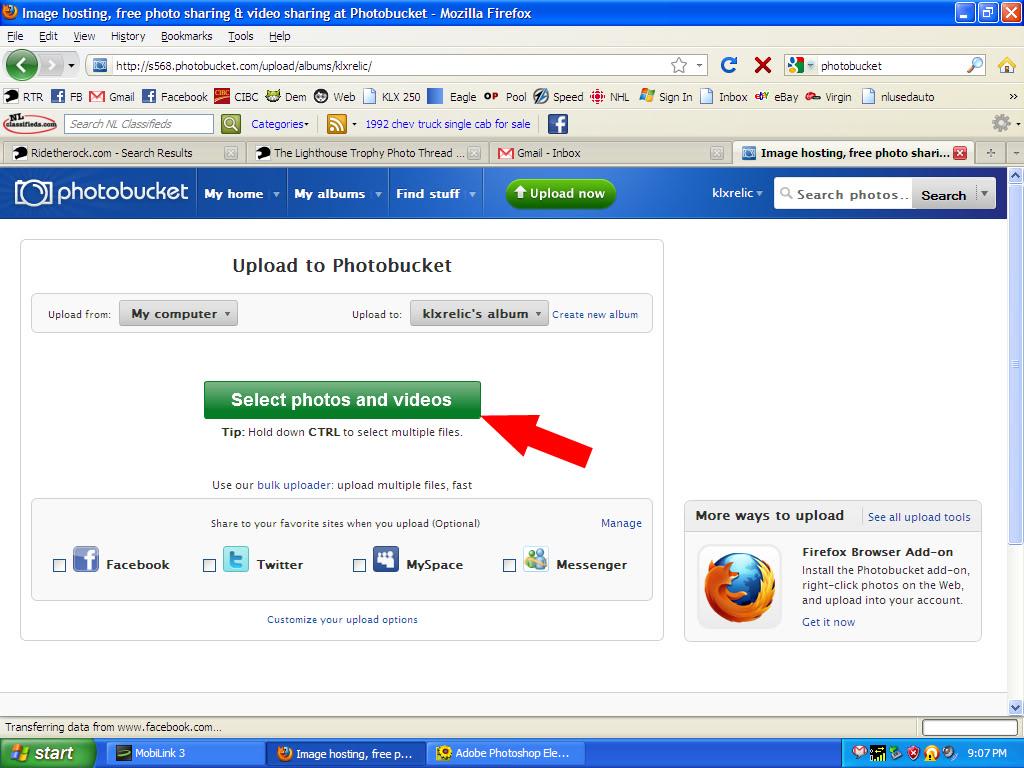
Notice on the top there are two buttons. One to select files from your computer (or elsewhere...) and another button where to put the pics. In my case I am selecting from my computer and placing them in klxrelic's album. Get these straightened out first then click on "Select photos or videos'.
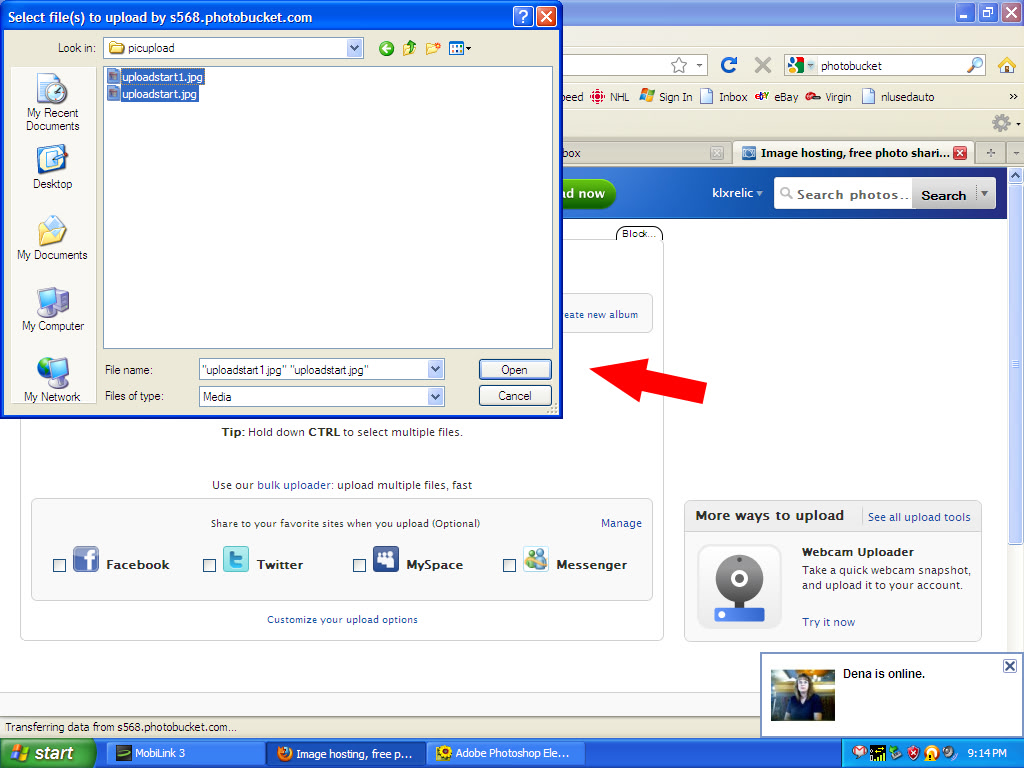
You will then have a pop-up window for ya to select where to get the photos off your computer. Once you select them click on "open":
Once upload is complete you see this screen:
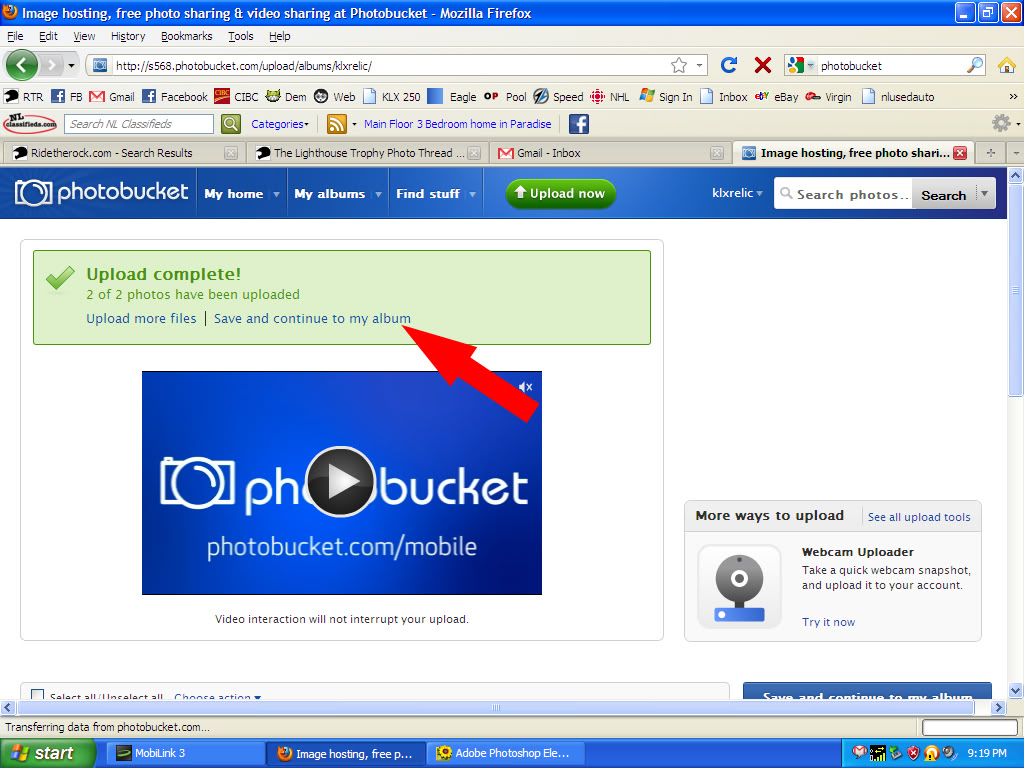
Select "save and continue to my album"
Next screen will be your album. Hover the mouse pointer over a pic and some info pops like this:
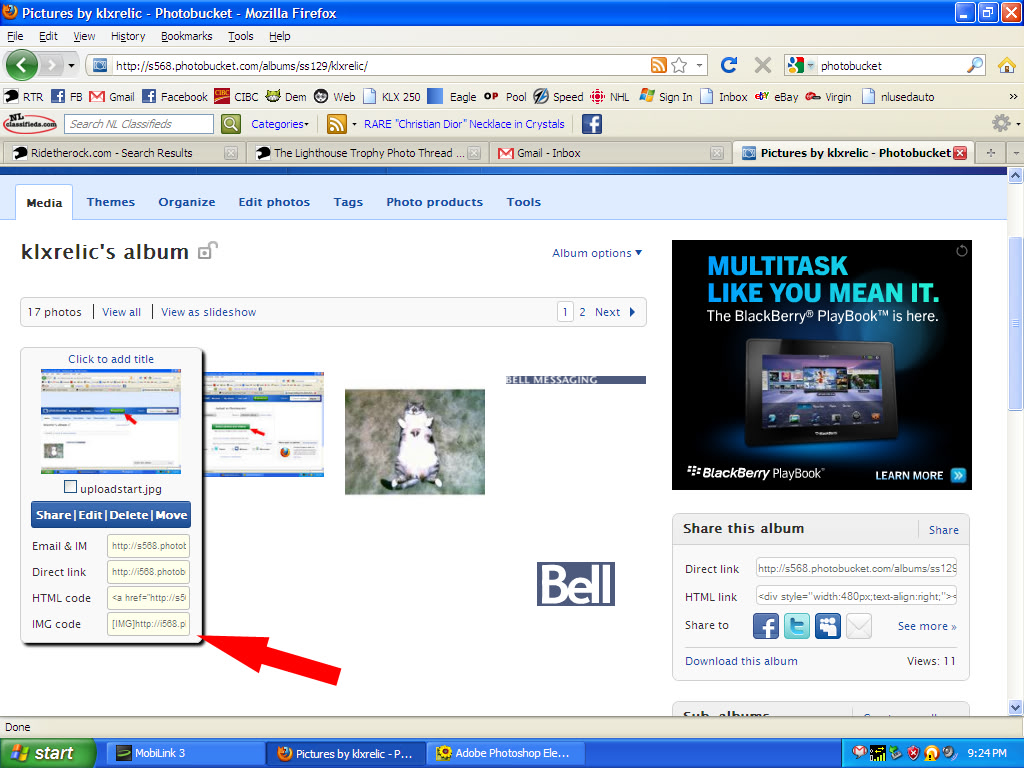
At the bottom will be a box with "IMG code"next to it. Left click inside the box and it will say "copied". Now all ya gotta do is paste it in the the thread you are writing in.
I may have missed something along the way...anyone spots any problems let me know.
This is based on Photobucket. So first thing you will have to do is sign up for a free account on their site. Once thats looked after sign and and you should see a page that looks something like this:
Click on the "Upload now" button.
You will then be brought to this screen:
Notice on the top there are two buttons. One to select files from your computer (or elsewhere...) and another button where to put the pics. In my case I am selecting from my computer and placing them in klxrelic's album. Get these straightened out first then click on "Select photos or videos'.
You will then have a pop-up window for ya to select where to get the photos off your computer. Once you select them click on "open":
Once upload is complete you see this screen:
Select "save and continue to my album"
Next screen will be your album. Hover the mouse pointer over a pic and some info pops like this:
At the bottom will be a box with "IMG code"next to it. Left click inside the box and it will say "copied". Now all ya gotta do is paste it in the the thread you are writing in.
I may have missed something along the way...anyone spots any problems let me know.
Thread Starter
|
Senior Member
Joined: Oct 2008
Posts: 328
From: Newfoundland, Canada
1st Gear Member
embedding using webshots
For the most part I rarely use photobucket. My preference is Webshots. Major disadvantage is the size of pics you can embed...600 pixels. But i find it's good enough and keeps the viewing pages tidy rather than large pics. The previous tutorial I used photobucket for embedding. This one I am using webshots.
OK: Same deal..sign up and sign in. Then up in top right-hand corner you will find an "upload" link. Click on that:

Next page will look like this:

Ok... here you follow steps in order.
Step1: "choose file". Same as in photobucket, you get a window pop-up to select files you want to upload. When done click the "open" button.
Step 2: Select album. You can make a new album ( which you will have to specify category and sub-category. Don't worry about finding the right categories too much...) or you you can put it in an existing album
Step 3: This only needs to be done if you create a new album. If using an existing album, you can't change this.
Once all three steps are done, the green "upload" button brightens and now you are able to click it to start up load.
Once upload is complete you get on a page showing your uploads only with a thumbnail of each. Next you click on the "embed links" tab.:

Now you should see this:

Next step is VERY IMPORTANT: Select "600" to generate code for a 600 pixel picture. Default is 100 pixel...pretty darn small.
Once code is generated at bottom in "post in forum" box single left click inside the box to highlight code, then right click it to select copy.
Now it's ready to paste in a thread.
That's it.
Now get out for a ride, take some pics, and post em up. You have no excuse now.
Happy posting.
OK: Same deal..sign up and sign in. Then up in top right-hand corner you will find an "upload" link. Click on that:
Next page will look like this:
Ok... here you follow steps in order.
Step1: "choose file". Same as in photobucket, you get a window pop-up to select files you want to upload. When done click the "open" button.
Step 2: Select album. You can make a new album ( which you will have to specify category and sub-category. Don't worry about finding the right categories too much...) or you you can put it in an existing album
Step 3: This only needs to be done if you create a new album. If using an existing album, you can't change this.
Once all three steps are done, the green "upload" button brightens and now you are able to click it to start up load.
Once upload is complete you get on a page showing your uploads only with a thumbnail of each. Next you click on the "embed links" tab.:
Now you should see this:
Next step is VERY IMPORTANT: Select "600" to generate code for a 600 pixel picture. Default is 100 pixel...pretty darn small.
Once code is generated at bottom in "post in forum" box single left click inside the box to highlight code, then right click it to select copy.
Now it's ready to paste in a thread.
That's it.
Now get out for a ride, take some pics, and post em up. You have no excuse now.
Happy posting.


Thread
Thread Starter
Forum
Replies
Last Post

