


ISO Grips Project


Thread Starter
|
Junior Member
Joined: Aug 2008
Posts: 5
From: Humboldt, TN
 ISO Grips Project
Hi all!
After much searching here and other sites I could find very little information on replacing the stock grips on my Vulcan 500 with Küryakyn ISO grips. Plenty on other Kawasaki models but nothing specific to the 500 so I decided to just take the bull by the horns and dive in. I hope the following photos and descriptions will be of help to other EN500 owners who might want to replace the grips.
After I received the new grips I laid them out to make sure I had everything that was supposed to be in the package. Yep, left and right grip, spacer and a bottle of glue. Death Grip glue! Reminds me of the movie Death Race 2000. This stuff scared me so I used Gorilla Glue instead.
All items and tools ready so now to work. The first thing to do is to remove the weight on each end of the handle bar.
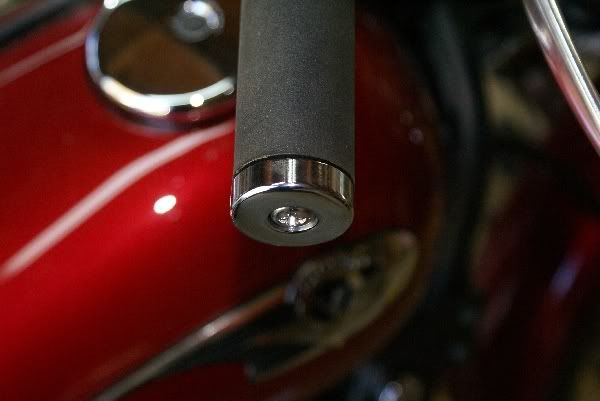
This is easier said than done. Kawasaki didn't want these weights to come off due to phillips screw backing out so they put on a liberal amount of thread locker. I had to use an impact screwdriver to get the screws out.
Now that the weights are off the rest of the project is a piece of cake. Remove the two screws (circled in red in the photo below) from the throttle housing.
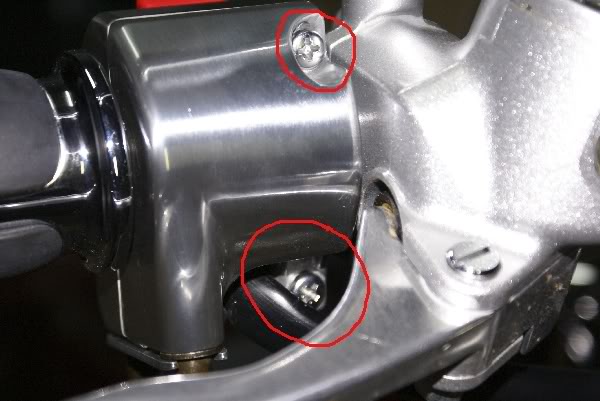
Also, remove the screw on the bottom.

With the throttle housing separated you can see the two throttle cables. With a pair of needle nose pliers remove the two cables and slide the stock grip off.

Your bike will then look like this.

This is a shot of the cable end of both the stock throttle grip and the ISO throttle grip.

Slide the new throttle grip on and put the cables back in place. Replace the screws and tighten. Done with the right grip and it looks like this.

Now for the left grip. As this shot shows I was able to get the grip off in one piece. I ran a skewer (the kind you use to grill veggies or ka bob) between the grip and the handle bar. Then I used compressed air and a blow nozzle to just "lift" the grip from the bar and slide it off.

A little sandpaper to remove the old adhesive and it was ready for the new grip.

There is a short piece of plastic that is cut to length to use as a spacer. This is needed because the new grip is longer than the stock grip. I cut the spacer to 5/8" (about 16 mm). I made a trial fit to make sure things lined up right and was happy with the fit. Then I put some Gorilla Glue in the grip and slid it on. This gives some time to get things lined up.
That's it. This is what how the bike looks with the new grips.

After much searching here and other sites I could find very little information on replacing the stock grips on my Vulcan 500 with Küryakyn ISO grips. Plenty on other Kawasaki models but nothing specific to the 500 so I decided to just take the bull by the horns and dive in. I hope the following photos and descriptions will be of help to other EN500 owners who might want to replace the grips.
After I received the new grips I laid them out to make sure I had everything that was supposed to be in the package. Yep, left and right grip, spacer and a bottle of glue. Death Grip glue! Reminds me of the movie Death Race 2000. This stuff scared me so I used Gorilla Glue instead.
All items and tools ready so now to work. The first thing to do is to remove the weight on each end of the handle bar.
This is easier said than done. Kawasaki didn't want these weights to come off due to phillips screw backing out so they put on a liberal amount of thread locker. I had to use an impact screwdriver to get the screws out.
Now that the weights are off the rest of the project is a piece of cake. Remove the two screws (circled in red in the photo below) from the throttle housing.
Also, remove the screw on the bottom.
With the throttle housing separated you can see the two throttle cables. With a pair of needle nose pliers remove the two cables and slide the stock grip off.
Your bike will then look like this.
This is a shot of the cable end of both the stock throttle grip and the ISO throttle grip.
Slide the new throttle grip on and put the cables back in place. Replace the screws and tighten. Done with the right grip and it looks like this.
Now for the left grip. As this shot shows I was able to get the grip off in one piece. I ran a skewer (the kind you use to grill veggies or ka bob) between the grip and the handle bar. Then I used compressed air and a blow nozzle to just "lift" the grip from the bar and slide it off.
A little sandpaper to remove the old adhesive and it was ready for the new grip.
There is a short piece of plastic that is cut to length to use as a spacer. This is needed because the new grip is longer than the stock grip. I cut the spacer to 5/8" (about 16 mm). I made a trial fit to make sure things lined up right and was happy with the fit. Then I put some Gorilla Glue in the grip and slid it on. This gives some time to get things lined up.
That's it. This is what how the bike looks with the new grips.

Thread
Thread Starter
Forum
Replies
Last Post
thanhtruong
PRIVATE For Sale / Trade Classifieds
6
Feb 10, 2008 09:23 AM
